Training times parents can find.Without asking in the group chat.
WallKiwi makes sports club notice boards. Type your training sessions, fixtures, kit and who to contact, and it turns them into a designed clubhouse board, with every time, venue and phone number exactly as you typed it. Print it on A4, cut it out and put it up by the changing rooms.
A clubhouse board, from one paragraph
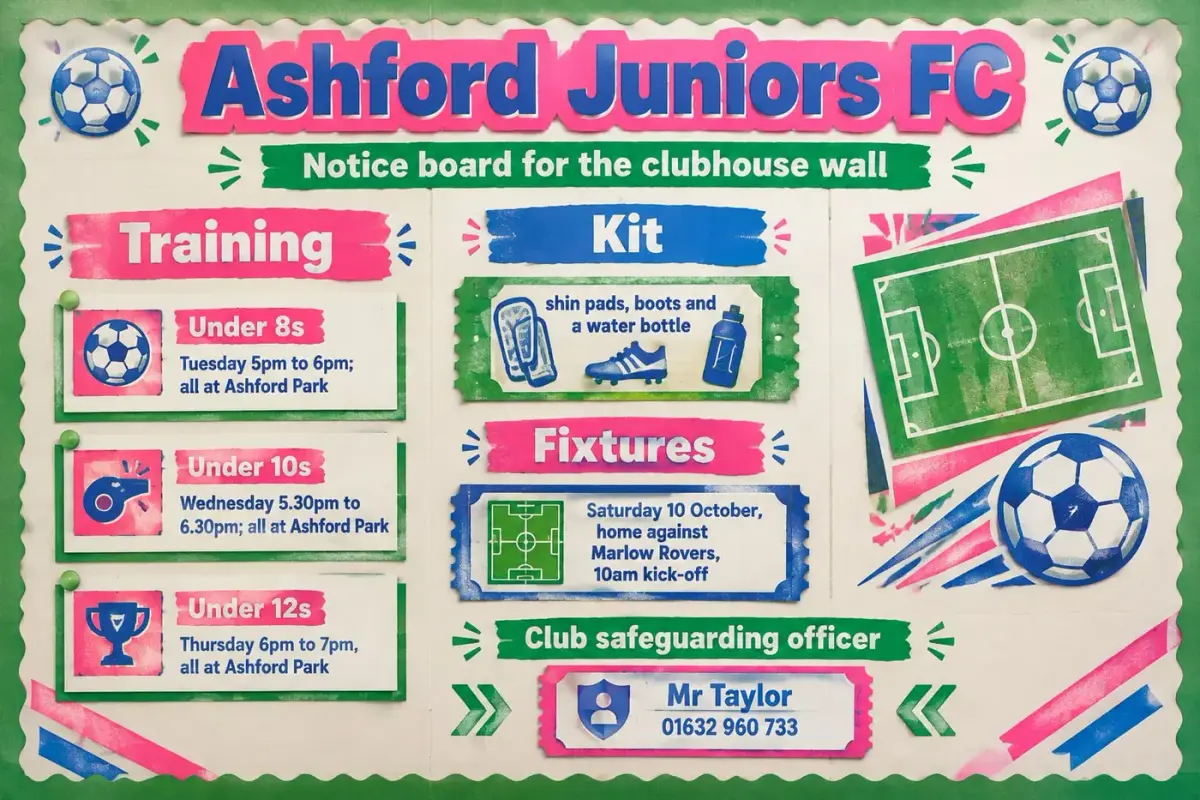
Three age groups, their training times, the fixture and the coach's number, all printed exactly as typed.
Notice board for Ashford Juniors Football Club, for the clubhouse wall. Title: Ashford Juniors FC. Training: Under 8s Tuesday 5pm to 6pm; Under 10s Wednesday 5.30pm to 6.30pm; Under 12s Thursday 6pm to 7pm, all at Ashford Park. Kit: shin pads, boots and a water bottle. Fixtures: Saturday 10 October, home against Marlow Rovers, 10am kick-off. Club safeguarding officer: Mr Taylor, 01632 960 733. Make the board bold and bright in football green and white.
Times, the kick-off and the safeguarding officer's number are printed as typed, so families always see the right ones.
A new season's board in three steps
- 1
Describe it
Type what the board is for and paste your own details: times, dates, names and numbers. Or start from a photo of a board you already have.
- 2
Pick a look and check it
WallKiwi designs three looks. Choose one, then read back every word before any piece is made.
- 3
Print, cut, put up
Every piece comes on A4 with an assembly guide first. Print at 100%, cut along the lines and pin it up.
What to put on a sports club notice board
Parents and players want the next session and the next match. Put those first.
Training times by age group
Each group with its day, time and pitch or pool. A small table is easier to scan than a paragraph.
Fixtures and results
Next match with the date, kick-off, opponent and venue. Keep the fixture list for this month only.
Kit and what to bring
A short checklist, so nobody turns up without boots or a water bottle.
Who's who
Coaches and managers by age group with their contact details, and the committee's names and roles.
Safeguarding and welfare
The club's safeguarding officer, how to raise a concern and where to find the club's policy. Use your governing body's own wording.
Sports club notice board ideas
Each one opens the maker with the words already typed, ready to change to your own.
Sports club notice board questions
What club secretaries, coaches and volunteers ask before they make one.
Ideas and layout
What should go on a sports club notice board?
Training times by age group, upcoming fixtures and results, kit and what to bring, who's who and how to contact the welfare officer. Put the next session and the next match at the top and keep each section short.
What are good sports club notice board ideas?
A training timetable, a fixtures and results panel, a player of the month section, a welcome card for new members and a sponsors thank you all work well. Choose what parents ask about most and give it the most space.
How do you make a club notice board look good?
Use one design for every piece, a bold title and space between sections. WallKiwi designs the headers, cards and borders together, so the board reads as one clear notice instead of a row of printouts.
What should be on a club welfare board?
The welfare officer's name and how to contact them, plus the official safeguarding information from your sport's national governing body. Paste their wording as written, because WallKiwi lays out your words and does not look anything up.
Getting the details right
Will it change our training times or phone numbers?
No. Every time, date, price, phone number and web address on the design must match what you typed. Anything that does not match is redesigned once, then removed, and you are told what was taken off.
How do I update fixtures through the season?
Keep fixtures as their own section and print just that sheet again when they change, or update your description and make the board again. Everything you make stays in your library to download again.
Can I start from the board we already have?
Yes. Add a photo of your current board instead of a description and WallKiwi rebuilds it as a printable pack. Add notes to say what should change, such as new training times.
Can I add photos of coaches or players?
Ask for a photo space in your description and add pictures after printing. Follow your club's safeguarding policy on photos of children, and only show people who have agreed.
Printing and putting it up
What paper is best for a clubhouse notice board?
Ordinary A4 works for every sheet. Print at 100%, never fit to page, and use card for headers and lettering, especially in a damp or busy clubhouse.
Should I laminate a sports club notice board?
Laminate pieces you reuse each season, such as headers and the who's who cards. Laminated cards can be written on with a dry-wipe pen, so results can be added each week.
How long does it take to make a club notice board?
Usually a few minutes. WallKiwi draws three looks in about half a minute to a couple of minutes, then makes every piece once you have chosen one. You can leave the page and come back to a finished pack.
Can I make a poster for one event?
Yes. Describe the event with its date, time, place and prices and WallKiwi designs a poster board for it. A single event simply comes back with fewer pieces.
Boards for other places
Make your club's notice board
Type your sessions and fixtures. Every time and venue prints exactly as you wrote it.