Parents read it at pick-up.In the thirty seconds they've got.
WallKiwi makes parent boards for nurseries and childminders. Type your session times, the week's menu, key people and this half term's learning, and it designs a board that says it plainly, with every time kept as you typed it. Print it on A4, cut it out and pin it by the door.

Made for busy early years settings
Nursery managers
One parent board in your setting's look, remade each term in minutes.
Room leaders
A board for your room's menu, routines and key people.
Childminders
A tidy welcome board without paying a designer.
Preschools and playgroups
Session times, fees and what to bring, said plainly.
What to put on a nursery parent board
Parents scan it at drop-off and pick-up. Put what they need today at the top and keep each section short.
Session times and days
Opening, drop-off and collection times in large type, plus any change for the holidays.
The week's menu
Meals and snacks by day. Say clearly where allergy information is kept, and write allergens exactly as your policy requires.
Meet your key person
Photos and first names of the team, with the key person system explained in a line. It builds trust quickly.
What we are learning this half term
The theme, a few songs or stories and one thing to try at home. It gives parents something to talk about on the way home.
Reminders and contacts
Sickness rules in plain words, the manager's number and the day for bringing wellies or spare clothes.
A parent board, from one paragraph
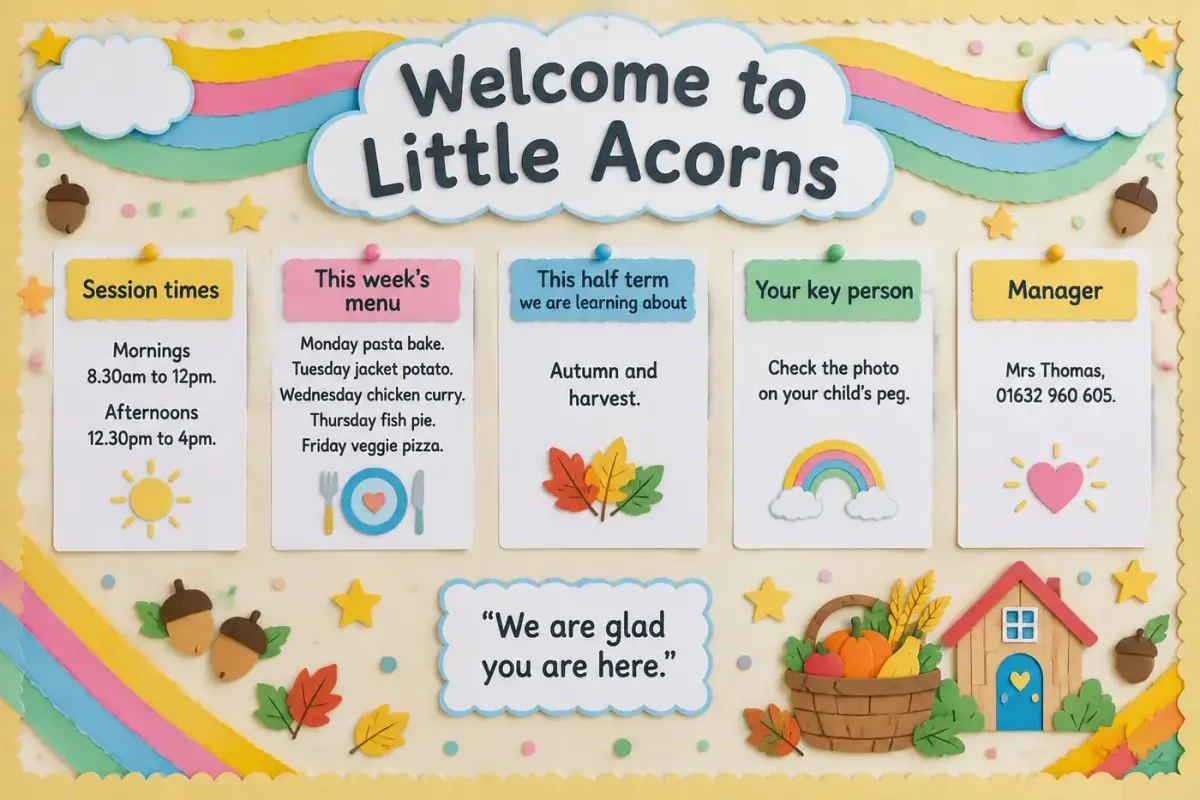
Session times, the menu and the manager's number printed exactly as typed.
Parents' board for Little Acorns Nursery, by the front door. Title: Welcome to Little Acorns. Sections: Session times: mornings 8.30am to 12pm, afternoons 12.30pm to 4pm. This week's menu: Monday pasta bake; Tuesday jacket potato; Wednesday chicken curry; Thursday fish pie; Friday veggie pizza. This half term we are learning about: autumn and harvest. Your key person: check the photo on your child's peg. Manager: Mrs Thomas, 01632 960 605. Bright, playful rainbow colours.
Session times, menu and phone number print exactly as typed, so parents can trust the board at a glance.
Nursery notice board ideas
Each one opens the maker with the words already typed, ready to change to your own.
Nursery notice board questions
What nursery managers and childminders ask before they make one.
Ideas and layout
What should be on a nursery parent notice board?
Session times, this week's menu, each child's key person, what you are learning this half term, reminders and who to contact. Parents read it in passing, so put today's essentials at the top and keep every section to a few short lines.
What are good nursery parent board ideas?
A meet your key person panel with photos, a weekly menu, a what we are learning section, upcoming dates, a reminders card and a thank you to families all work well. Choose what parents ask about most and give it the most space.
What should a childminder put on a welcome board?
Your name and registration details, your hours, what children should bring, how you share news with parents and how to contact you. Paste your own wording, because WallKiwi prints exactly what you give it and adds no facts of its own.
How do you make a nursery notice board look nice?
Use one look for every piece, a clear title, bright but calm colours and space between sections. WallKiwi designs the headers, cards and borders together, so the board reads as one welcoming notice.
Getting the details right
Will it change our session times or phone number?
No. Every time, date, price and phone number on the design must match what you typed. Anything that does not match is redesigned once, then removed, and you are told what was taken off.
Can I add photos of staff?
Yes. Ask for a space under each name, such as "leave a space for a photo", and add your own staff photos after printing. Only show people who are happy to be on the board, and never put children's photos on a board by the door.
How do I change the menu every week?
Keep the menu as its own section and print just that sheet again when it changes, or change the week in your description and make it again. Everything you make stays in your library to download again.
Can I rebuild a board we already have?
Yes. Add a photo of your current board instead of a description and WallKiwi rebuilds it as a printable pack. Add notes to say what should change, such as new session times.
Printing and putting it up
What paper is best for a nursery notice board?
Ordinary A4 works for every sheet. Print at 100%, never fit to page, and use card for headers and any pieces little hands might reach, so they last longer.
Should I laminate the parent board?
Laminate pieces you reuse, such as headers and key person cards. Laminated cards can be written on with a dry-wipe pen, so one set lasts all year.
How long does it take to make a nursery parent board?
Usually a few minutes. WallKiwi draws three looks in about half a minute to a couple of minutes, then makes every piece once you have chosen one. You can leave the page and come back to a finished pack.
Can I make room displays too?
Yes. Describe any display, such as a seasons board or a feelings wall, and WallKiwi designs it the same way. It also makes matching lettering, bunting and cut-out decorations.
Is there a free example I can download?
Yes. Opening and downloading the example packs is free and uses no credits, so you can see a finished pack before you make your own.
Boards for other places
Make your parent board
Type your session times, menu and key people. Every time prints exactly as you wrote it.