This week's activities, at a glance.Clear enough to read from a chair.
WallKiwi makes care home activities boards. Type the week's plan, the menu and visiting times and it lays them out as a board for the lounge, with each day, time and activity set out clearly. Every time stays exactly as you typed it, so residents and visitors can trust it.

A new week's board in three steps
- 1
Describe it
Type what the board is for and paste your own details: times, dates, names and numbers. Or start from a photo of a board you already have.
- 2
Pick a look and check it
WallKiwi designs three looks. Choose one, then read back every word before any piece is made.
- 3
Print, cut, put up
Every piece comes on A4 with an assembly guide first. Print at 100%, cut along the lines and pin it up.
A week of activities, from one paragraph
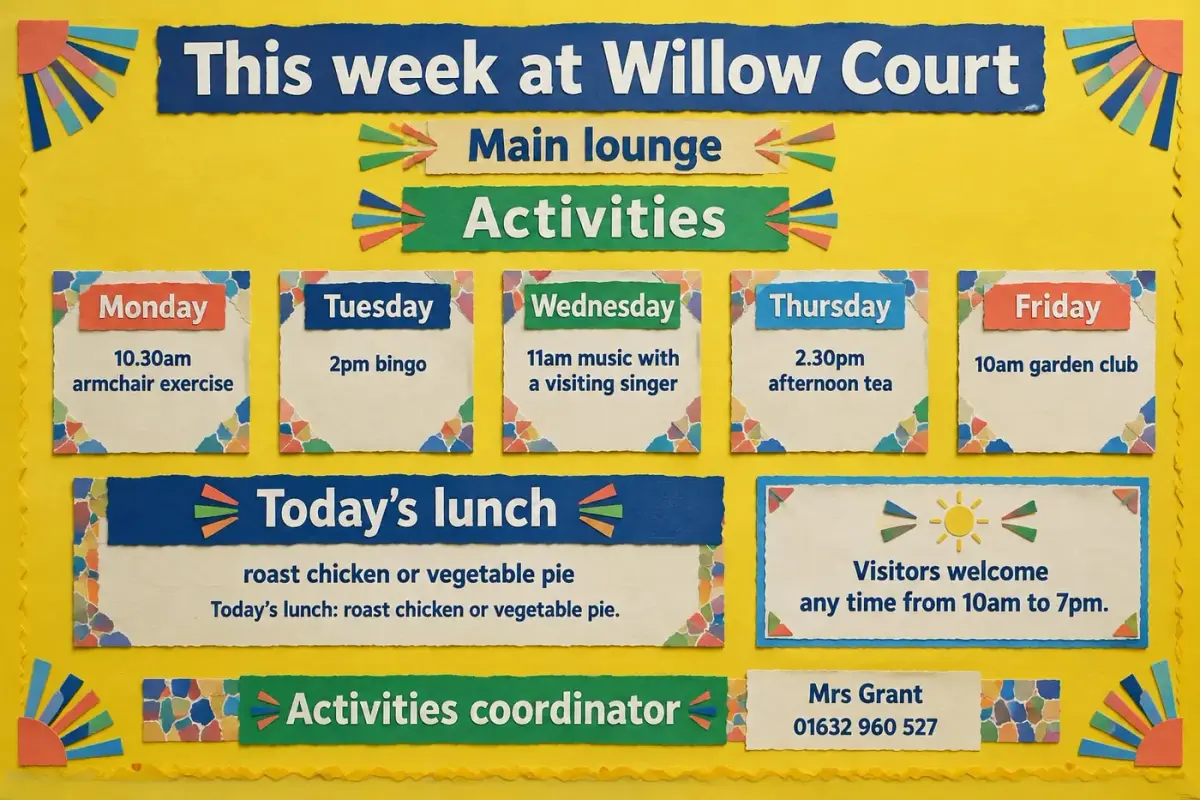
Five days, five activities, lunch and the coordinator's number, each printed exactly as typed.
Activities board for Willow Court Care Home, for the main lounge. Title: This week at Willow Court. Monday 10.30am armchair exercise; Tuesday 2pm bingo; Wednesday 11am music with a visiting singer; Thursday 2.30pm afternoon tea; Friday 10am garden club. Today's lunch: roast chicken or vegetable pie. Visitors welcome any time from 10am to 7pm. Activities coordinator: Mrs Grant, 01632 960 527. Make the board bright and cheerful in sunshine yellow, green and blue, with very large dark lettering and high contrast.
Days, times and the coordinator's number print exactly as typed, in large high contrast lettering.
What to put on a care home activities board
Residents and visitors look for today first, then the rest of the week. Make today the biggest thing on the board.
Today, in large type
The day, date and what is happening now and next. Many homes show it in the largest lettering on the board.
The week's activities
A simple list by day with the time and the place. Keep each line to a few words.
Visitors and outings
Visiting musicians, therapy animals, church groups and trips, with dates and start times.
The menu
The main choices for the day. Where allergen information is kept should be stated clearly, from your kitchen's own records.
Who is here to help
The staff on duty and the activities lead, with photos where residents like them, and visiting hours for families.
More boards for the home
Each one opens the maker with these words already typed. Change the names and times to your own.
Today's date and weather board
Orientation board for Ashcroft Care Home lounge. Title: Today is. Leave big blank spaces for the day, the date, the month and the weather, to be written by hand each morning. Below: Next activity: written by staff. Very large clear sans-serif lettering, black on white, no decoration.
Blank spaces stay blank, so staff can write the changing details by hand each day.
Start with thisFamily visiting board
Visitors board for the entrance of Lakeside House. Title: Welcome, family and friends. Visiting hours 10am to 7pm every day. Please sign in and use the hand gel. Afternoon tea in the conservatory at 3pm, visitors welcome. Questions? Ask reception or ring the manager, Mr Bose, on 01632 960 660.
A short welcome for visitors that follows the same facts-first rule.
Start with thisCare home activities board questions
What activities coordinators ask before they make one.
Ideas and layout
How do you make a care home activities board?
List each day's activity with its time and place, add today's menu and visiting times, then type it into WallKiwi. It designs three looks, you pick one and check every word, and the pieces print on A4 to cut out and pin up.
What should be on a care home activities board?
Today's activities in large type, the rest of the week, the menu, visiting times and who to ask. Residents read it from a chair and visitors read it in passing, so keep each line short and leave space between days.
What are good activities board ideas for a care home?
A weekly timetable, a today card that moves along each morning, a birthdays panel, an outings and visitors section, and photos from recent activities all work well. Pick what residents ask about most and give it the most space.
How do you make an activities board easy to read for residents?
Use large type, plenty of space, strong contrast and one simple picture per activity. Put today at the top and keep the same layout every week, so residents always know where to look.
Getting the details right
Will it change the times I type?
No. Every time, date, phone number and price on the design must match what you typed. Anything that does not match is redesigned once, then removed, and you are told what was taken off.
How do I update the board every week?
Change the week in your description and make it again, or keep the headers and frames that never change and reprint only the day cards. Everything you make stays in your library to download again.
Can I include residents' photos or names?
Ask for a photo space in your description and add pictures after printing, only with consent. Keep personal details off a board that visitors and contractors can read.
Can I rebuild a board we already have?
Yes. Add a photo of your current board instead of a description and WallKiwi rebuilds it as a printable pack. Add notes to say what should change, such as next week's activities.
Printing and putting it up
What paper is best for a care home notice board?
Ordinary A4 works for every sheet. Print at 100%, never fit to page, and use card for headers and the day cards you move around, so they last through being handled.
Should I laminate the activities board?
Laminate the pieces you reuse every week, such as the day headers and the today card. Laminated cards can be written on with a dry-wipe pen, so one set lasts for months.
Where should the activities board go?
Somewhere residents pass every day and can stop, such as the lounge or the dining room entrance, at seated eye level. A second copy by the front door helps visitors plan when to come.
How long does it take to make an activities board?
Usually a few minutes. WallKiwi draws three looks in about half a minute to a couple of minutes, then makes every piece once you have chosen one. You can leave the page and come back to a finished pack.
Can I make a menu board or visiting times sign too?
Yes. Any board for the home works the same way: describe it, paste your own details, check the words and print. A short sign simply comes back with fewer pieces.
Boards for other places
Make this week's activities board
Type the week. Every day and time prints exactly as you wrote it.